Skip to content
AL Report CreatorBUSINESS CENTRAL · VS CODE
PricingFAQDocumentation
DE/EN
WelcomeYou are not signed in.
▦Customer portal◇Admin portal ✎Edit website Sign in

Chapters ☰
Documentation Qucamba Reports: transfer your company’s licence Getting started and setup Create new reports with the wizard
Edit reports: commands and tools
  • ALRC: Add regions to columns and triggers
  • ALRC: Open Layout Externally
  • ALRC: Rename Report Columns
  • ALRC: Rename report labels
  • ALRC: Add data item filters to report
  • ALRC: Add Global Data Mgt. pattern to report
  • ALRC: Add carry overs to Report
  • ALRC: Create foreign key buffer table
  • ALRC: Copy Report
Review reports with live data
Design layouts: styles and presets
  • Apply template
  • Page layout
  • Normalize layout
  • Add tablix header separator line
  • Tablix grouping columns
  • Alternating row colors
  • Format text
  • Format text by value
  • Blank numeric values
  • Trailing comments
  • Replace fonts
  • Replace colors
  • Filters and semantic roles
  • Style preview: Analyze
  • Create and manage presets
Inspect datasets and find errors Settings and preview profiles Backups and maintenance
AL Report Creator/ Documentation /Design layouts: styles and presets /Replace fonts

Documentation

Replace fonts

Replace selected font families, sizes and weights.

Replace fonts

Replaces selected font families and, optionally, particular sizes or weights. Match specific source formatting to preserve deliberate exceptions.
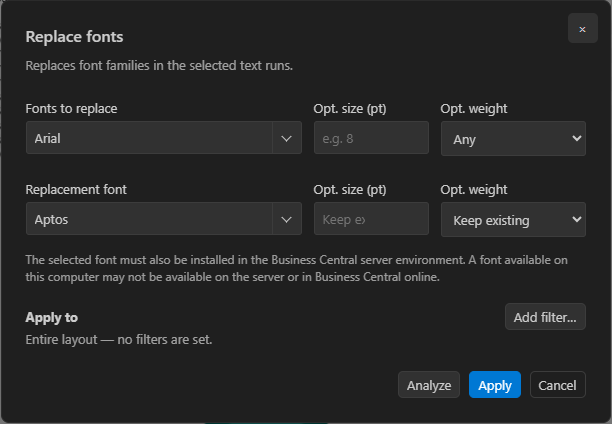
Replace fonts by their current formatting
Replace fonts by their current formatting · Full size
Previous chapterTrailing comments Next chapterReplace colors
AL Report Creator

AL, layouts and live data in VS Code.

FAQ Documentation Legal noticePrivacy Terms
© 2026 AL Report Creator